

News & Posts
Usability Testing With Eye Tracking: A Professional How-To Guide
© unsplash
With the global eye-tracking market projected to reach $26.89 billion by 2035, the research sector is shifting toward a future where visual attention is the primary currency of design. You've likely experienced the friction of data noise or the difficulty of explaining the ROI of high-end sensors to stakeholders who demand immediate results. It's frustrating when calibration issues obscure the "why" behind a user's journey. Mastering usability testing eye tracking is no longer a luxury for academic labs; it's a vital requirement for any professional aiming to decode the subconscious drivers of human behavior with clinical precision.
Eliminate the ambiguity of traditional UX metrics and embrace the next phase of behavioral research. Bridge the gap between raw data and visionary insights with a repeatable workflow that synchronizes Dikablis Glasses with Prophea.X software. We'll show you how to remove technical friction and integrate biometric sensors like EEG for a holistic view of the user experience. This guide moves from the theoretical foundations of human-centered design to the practical implementation of high-precision studies that stand up to the most rigorous industrial scrutiny. Prepare to transform your methodology into a legacy of excellence.
Key Takeaways
- Bridge the “Subconscious Gap” by uncovering cognitive friction and visual patterns that users cannot articulate during traditional post-test interviews.
- Differentiate between fixations and saccades to accurately map how the human brain processes visual information during a complex digital interaction.
- Select the optimal hardware architecture for your research goals, utilizing remote trackers for software or wearable Dikablis Glasses for real-world product testing.
- Execute a rigorous, multimodal workflow for usability testing eye tracking that prioritizes precise environment calibration and KPI-based Area of Interest mapping.
- Leverage Prophea.X to transform complex gaze data into actionable UI design requirements through AI-assisted analysis and seamless sensor synchronization.
Table of Contents
- Beyond the Click: Why Usability Testing Needs Eye Tracking
- Decoding the Visual Language: Fixations, Saccades, and Heatmaps
- Selecting the Right Architecture: Remote vs. Wearable Eye Tracking Systems
- The Workflow: A Step-by-Step Guide to Executing a Multimodal Study
- From Raw Gaze Data to Actionable UX Strategy with Prophea.X
Beyond the Click: Why Usability Testing Needs Eye Tracking
Abandon the assumption that verbal feedback reflects the total user experience. Traditional UX methodologies frequently hit a wall because participants are often unreliable narrators of their own subconscious actions. They might claim a navigation menu was intuitive while their physiological data shows a prolonged search period; this contradiction is known as social desirability bias. By integrating usability testing eye tracking, you bypass the filter of conscious thought and gain access to the raw, unfiltered reality of how a user perceives your interface. It’s the difference between hearing a story and witnessing the event in real time.
The “Subconscious Gap” represents the critical moments of cognitive friction that users cannot articulate in post-test interviews. These micro-struggles happen in milliseconds, far too fast for the conscious mind to register or remember. In 2026, the industry has shifted from qualitative “look-and-see” observations toward quantitative behavioral metrics that stand up to scientific scrutiny. Visual attention is now recognized as the primary proxy for cognitive load. When you measure gaze, you aren’t just seeing where someone looks; you’re mapping the efficiency of their interface navigation and the mental effort required to complete a task.
The Evolution of Human-Machine Interaction (HMI)
Modern digital ecosystems have reached a level of complexity where simple click-tracking is no longer sufficient. High-precision data is now a requirement for mission-critical interfaces in sectors such as automotive engineering, medical device design, and industrial control rooms. In these environments, a missed visual cue can lead to catastrophic failure. Explore our guide on human machine interaction studies to see how gaze synchronization ensures safety and efficiency in the next generation of technology. We don’t just observe the human; we empower the interaction.
Identifying Visual Friction Points
High-density UIs often suffer from “Banner Blindness” or “Gaze Overload,” where users overlook critical information because of poor visual hierarchy. Eye tracking technology provides the clinical precision needed to distinguish between a user lingering on an element because of interest versus lingering because of confusion. By analyzing fixation duration, researchers can determine if a layout follows efficient scanning behaviors like the F-pattern or if the visual flow is fragmented. Usability testing eye tracking allows you to identify these friction points early, transforming design from a series of aesthetic guesses into a data-driven strategy for UI optimization.
Decoding the Visual Language: Fixations, Saccades, and Heatmaps
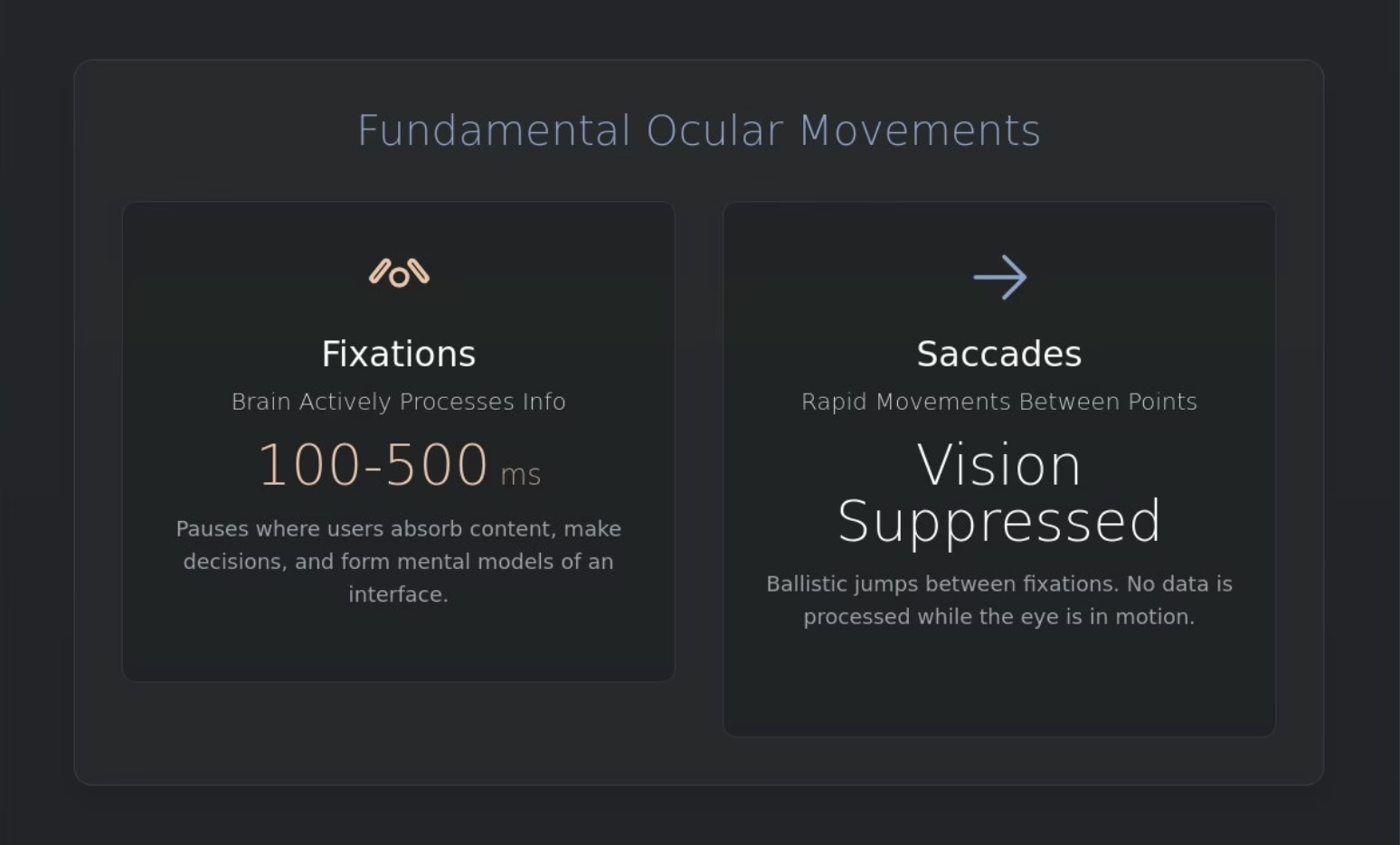
To master the integration of high-precision research, one must first understand the biological physics of human sight, a field where clinical experts like The Eye Centre provide essential diagnostic care for everyday vision health. Usability testing eye tracking relies on the distinction between two fundamental ocular movements: fixations and saccades. Fixations represent the specific moments where the brain actively processes visual information, typically lasting between 100 and 500 milliseconds. These pauses are where the user absorbs content, makes decisions, and forms mental models of your interface. Conversely, saccades are the rapid, ballistic movements between these points. During a saccade, the brain effectively suppresses visual input, meaning no data is processed while the eye is in motion.
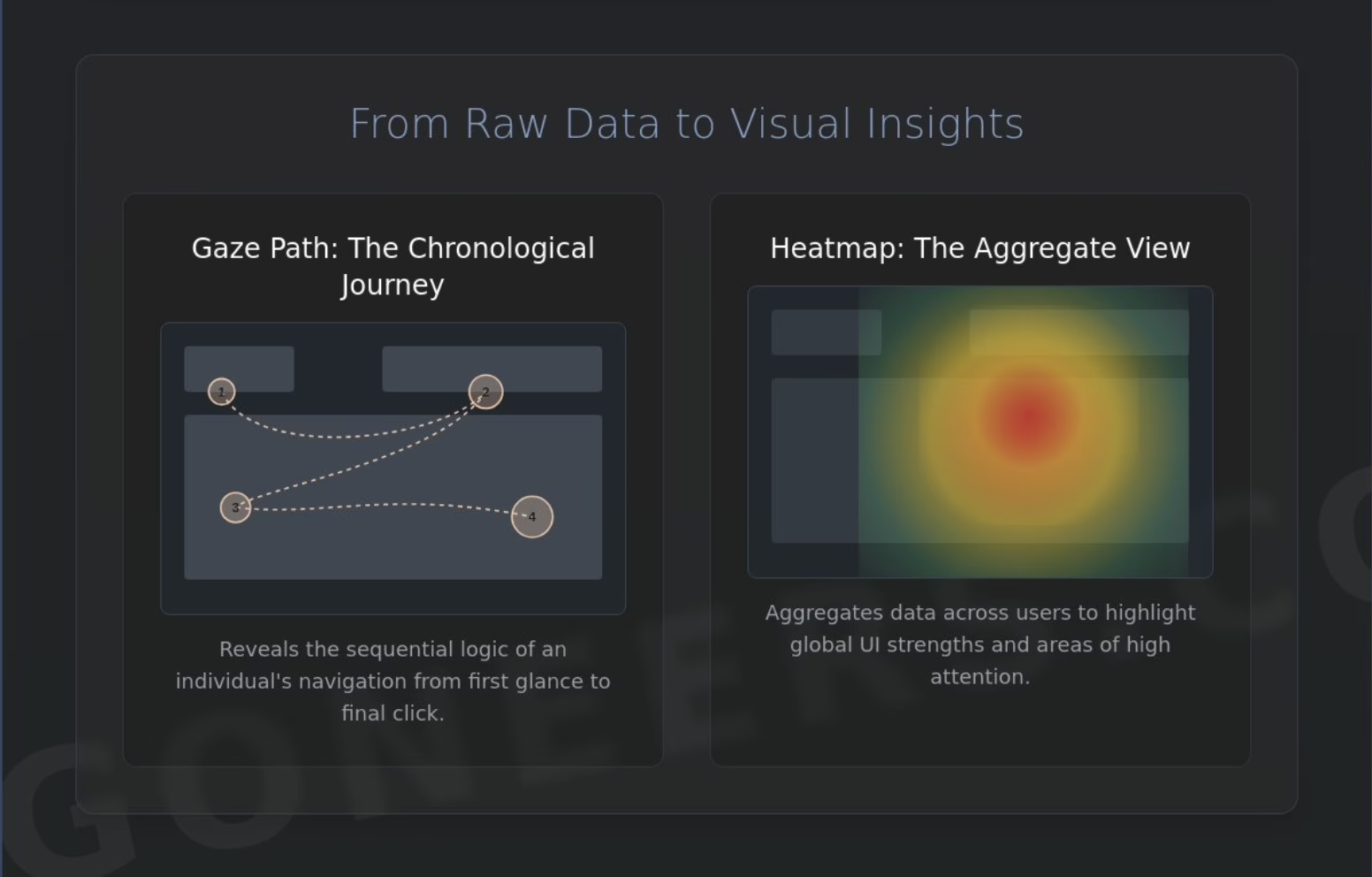
Reconstructing the user journey requires a chronological perspective. Gaze paths visualize the sequence of attention, allowing researchers to see exactly how a participant navigates a layout from their first glance to the final click. While gaze paths reveal individual logic, heatmaps offer a density-based perspective. By aggregating data across multiple participants, heatmaps identify global UI strengths and weaknesses, highlighting which areas command the most attention and which are ignored. Integrating Eye Tracking in usability studies transforms these visual patterns into objective evidence, removing the guesswork from design optimization.
Quantitative vs. Qualitative Gaze Data
Gaze replays serve as a vital qualitative tool, offering a frame-by-frame look at individual behavior that exposes the “why” behind navigation errors. For a more clinical approach, researchers rely on quantitative metrics like Time to First Fixation (TTFF). This metric measures the exact interval required for a user to identify a critical call-to-action (CTA). A high fixation count across an entire page often signals visual clutter, suggesting that the search task is inefficient and the cognitive load is too high.
The Science of Areas of Interest (AOIs)
Precision research demands the use of Areas of Interest (AOIs) to isolate the performance of specific components. Modern software allows you to define static AOIs for traditional web layouts or dynamic AOIs that track moving elements in video or mobile environments. By quantifying the data within these geometric boundaries, you can extract the statistical significance needed for rigorous A/B testing. Areas of Interest (AOIs) function as the primary analytical tool for isolating the performance of specific UI elements by quantifying the gaze data captured within predefined geometric regions. If you are ready to implement these high-precision metrics into your own research workflow, reach out to our team for expert guidance on hardware integration.
Selecting the Right Architecture: Remote vs. Wearable Eye Tracking Systems
Design your research environment with the end result in mind. The architecture of your hardware dictates the depth of the insights you can extract from the human experience. In the field of usability testing eye tracking, professionals must choose between two distinct pathways: remote, screen-based sensors or wearable, head-mounted systems. Each configuration serves a specific purpose in the evolution of human-centered design. While remote trackers provide a stationary reference point for digital interfaces, wearable systems offer the freedom to explore physical interactions in the three-dimensional world. Your choice depends entirely on where the user’s attention is expected to dwell.
Technical specifications like sampling rates are not merely academic details; they define the resolution of your behavioral data. For standard UX tasks, a 60Hz sampling rate is often sufficient to identify fixations and general gaze paths. However, capturing the subtle dynamics of microsaccades or rapid visual search patterns requires 120Hz or higher. High-frequency data ensures that your analysis remains robust even during long-duration research sessions where calibration stability can often degrade. Integrating usability testing with eye-tracking methodologies requires a commitment to this level of technical precision to ensure that your findings stand up to both industrial and academic scrutiny.
When to Choose Dikablis Professional Glasses
Deploy wearable glasses when your research moves beyond the confines of a computer monitor. Dikablis Professional Glasses are essential for high-mobility studies, such as sports science eye tracking or real-world retail interactions. These systems allow you to overcome the common parallax error found in inferior head-mounted devices, ensuring that the gaze point remains accurate even as the user moves through space. Wearable trackers are also the primary tool for immersive simulation and VR environments, where the relationship between the user and their surroundings is constantly shifting.
Remote Tracking for Digital Interfaces
Prioritize remote trackers for web, mobile app, and software usability testing. These non-intrusive setups are often integrated directly into high-resolution monitors, preserving natural user behavior by remaining virtually invisible during the study. Remote systems excel in varied lighting conditions and are compatible with a wide range of participants, including those who wear corrective lenses. They serve as the backbone for large-scale usability testing eye tracking platforms where consistency across multiple sessions is vital. By removing the physical presence of the sensor, you allow the user to focus entirely on the task at hand, resulting in cleaner, more authentic behavioral data.
The Workflow: A Step-by-Step Guide to Executing a Multimodal Study
Executing a high-precision study requires a shift from isolated observation to a rigorous, multi-layered protocol. In 2026, usability testing eye tracking has evolved into a multimodal discipline where visual data is just one chapter of the human story. Follow this five-step sequence to ensure your findings stand up to the most demanding industrial and academic scrutiny:
- Step 1: Define Research Objectives. Map your KPI-based Areas of Interest (AOIs) before the participant enters the lab to ensure every data point serves a specific design question.
- Step 2: Environment Calibration. Control for ambient illumination and participant positioning. Even minor variances in light can skew pupil dilation data, which is a vital indicator of cognitive load.
- Step 3: Multi-Sensor Integration. Synchronize your gaze trackers with secondary physiological sensors such as EEG, EMG, or skin conductance to capture the user’s total state.
- Step 4: Execute the Protocol. Balance traditional “Think Aloud” methods with periods of natural gaze flow. This prevents the verbalization process from contaminating the raw visual search patterns.
- Step 5: Data Cleaning and Coding. Utilize automated behavioral coding to filter out noise and transform raw gaze streams into actionable insights.
Preparing the Multimodal Lab
Technical synchronization is the most frequent point of failure in complex behavioral studies. Ensure your hardware communicates flawlessly through specialized platforms for custom eye tracking integration. This setup minimizes jitter and ensures microsecond timestamp accuracy across every sensor. It’s especially critical when correlating a millisecond-long fixation with a spike in brain activity. When recruiting, address the “glasses-wearer” challenge early by selecting hardware that supports corrective lenses without sacrificing calibration stability. Precision starts with the environment you build.
Analysing Synchronised Data Streams
Decoding the human experience requires looking past the gaze point alone. By correlating pupil dilation with physiological stress markers like Heart Rate or Electrodermal Activity (EDA), you gain a window into the user’s emotional state. Use gaze data to “ground” EEG signals; this allows you to identify exactly which UI element triggered a specific neurological response. Data synchronization is the cornerstone of 2026 behavioral research. It transforms a collection of disparate numbers into a cohesive narrative of human-technology interaction. If you’re ready to build a lab that leads the industry, contact our consulting team for a professional lab assessment.
From Raw Gaze Data to Actionable UX Strategy with Prophea.X
Synthesizing raw data into a coherent design strategy is the final, most critical stage of the research cycle. While previous sections of this guide focused on the hardware and the biological physics of sight, the true value of usability testing eye tracking lies in its ability to influence the boardroom. Prophea.X possesses the analytical agency to transform thousands of disparate gaze points into a structured framework for UI optimization. It moves beyond the static nature of a traditional heatmap, allowing you to visualize the “Attention Funnel” and identify exactly where users lose focus before reaching your primary call-to-action. This vision-driven evidence empowers you to justify design budget increases with the quiet confidence of scientific proof.
High-precision research shouldn’t be synonymous with manual labor. By personifying the data analysis process, Prophea.X acts as a collaborative partner that sifts through complex multimodal streams to find the “why” behind user behavior. It provides the clinical precision required to turn a “look-and-see” observation into a definitive design requirement. When stakeholders see the visual path of a user’s struggle, the conversation shifts from subjective opinion to objective reality.
AI-Assisted Behavioral Coding
The next phase of behavioral research relies on automation to handle the sheer volume of modern data sets. Leveraging advanced behavioral research software allows you to automate object recognition within video feeds, removing the need for frame-by-frame manual coding. Some industry professionals report that automated event detection can reduce analysis time by up to 70%, allowing teams to focus on high-level insights rather than data entry. This shift toward predictive gaze modeling enables you to use historical data to forecast future user paths, creating an agile research environment that stays ahead of technological revolutions.
Building a Legacy of Human-Centred Design
True innovation isn’t found in one-off tests but in a continuous culture of behavioral inquiry. By establishing long-term eye tracking data repositories, you create a brand-wide design system rooted in actual human needs. This longitudinal approach ensures that every iteration of your product is more intuitive than the last, building a legacy of excellence that distinguishes your work in a crowded market. Prioritizing the human element serves as both an ethical and functional guide for your organization. Discover how Prophea.X can transform your research workflow and help you lead the next generation of human-technology interaction.
Pioneering the Next Dimension of Behavioral Insights
The transition from speculative design to scientific certainty requires a commitment to the raw data of the human experience. By mastering usability testing eye tracking, you’ve moved past the limitations of traditional UX to embrace a world where visual attention and physiological state are perfectly synchronized. You now possess the framework to distinguish between user interest and cognitive friction; this ensures that every interface adjustment is backed by clinical evidence rather than aesthetic guesswork.
Our legacy is built on this intersection of academic rigor and industrial application. Founded as a spin-off from the Technical University of Munich (TUM), we’re trusted by global leaders in automotive and medical HMI to deliver error-free precision. Prophea.X stands as your vital partner in this evolution, offering the seamless synchronization of multimodal research data needed to lead technological revolutions. It’s time to transform your lab into a visionary center for human-centered design and build a lasting legacy of empowerment.
Explore Prophea.X: The Unified Platform for Behavioral Analysis
Step into the future of research with the quiet confidence that your data stands up to the highest scrutiny. Your journey toward deeper human insights begins today.
Frequently Asked Questions
Integrate eye tracking into small-scale studies to uncover the critical “why” behind user errors. While large-scale studies offer statistical power, even a handful of participants can expose fundamental layout flaws. This qualitative depth identifies visual friction points that users often fail to articulate during standard interviews. It’s an investment in the precision of your human-centered design that pays dividends in reduced development rework.
Aim for a cohort of 30 to 40 participants if your objective is quantitative statistical significance. This volume allows for robust data aggregation and the generation of reliable heatmaps. If your focus is qualitative discovery, 5 to 8 participants typically reveal the most significant usability hurdles. Align your participant count with the specific research goals of your usability testing eye tracking protocol to ensure actionable results.
Utilize high-precision eyetracking hardware to accommodate participants wearing corrective lenses or contacts. Professional systems, such as Dikablis Glasses, are engineered to maintain calibration stability across a diverse range of visual aids. While bifocals or heavy infrared-reflective coatings can occasionally introduce noise, modern algorithms effectively mitigate these discrepancies. Always perform a secondary calibration check to ensure data integrity for these specific users.
Distinguish between these tools based on the nature of the insight you require. A heatmap aggregates data across multiple users to visualize the density of attention, highlighting which UI elements command the most focus. In contrast, a gaze plot maps the chronological sequence of an individual’s eye movements. This reveals the specific mental model and navigation logic a single user employs to complete a task within the interface.
Achieve seamless synchronization through a centralized platform like Prophea.X. This software acts as the intellectual core of your lab, aligning eye tracking streams with EEG, EMG, or heart rate data via unified timestamps. Precision synchronization eliminates jitter and allows you to correlate a specific visual fixation with a physiological response. This multimodal approach provides the most comprehensive view of the human-technology interaction available in 2026
Deploy specialized remote mounts or wearable glasses to capture interactions on mobile devices and tablets. Remote trackers attached to mobile device stands are ideal for app testing in a controlled lab environment. For more natural, high-mobility research, wearable systems allow users to interact with devices in real-world settings. Both configurations provide the high-precision data necessary to optimize small-screen interfaces for complex digital ecosystems.
Minimize participant self-consciousness by utilizing non-intrusive remote hardware that remains virtually invisible during the study. Incorporate a brief “warm-up” period at the start of the session to allow the user to acclimate to the lab environment. When the technology fades into the background, participants return to their natural behavioral patterns. This ensures your usability testing eye tracking data reflects authentic behavior rather than a performance for the researcher.
Prioritize Time to First Fixation (TTFF) if your primary goal is to measure the findability of critical UI elements. This metric reveals how long it takes for a user to identify a specific call-to-action or navigation cue. While other metrics like fixation duration indicate cognitive load, TTFF is the definitive measure of visual hierarchy effectiveness. Choose your primary metric based on the specific success criteria of your unique interface design.